Snap the nameplate. The specs fill in for you.
Then every furnace, rooftop unit and appliance keeps its service history and its next maintenance, on your phone even with no signal, and on a QR tag anyone can scan.
Free to download. Core tracking always free — no ads, no credit card required. See exactly what's free vs Pro →
Or start a 7-day free trial on the web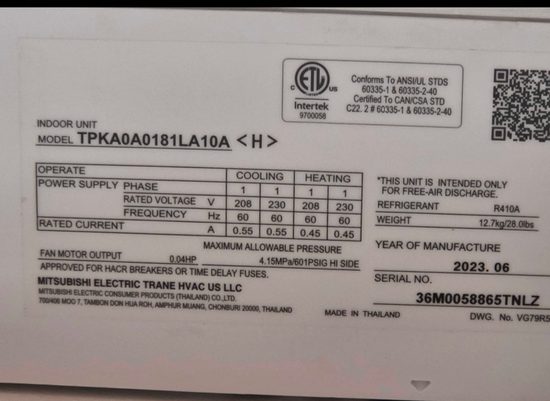
Or see how it works for you:
I manage properties or buildings
A QR tag inside every door sends repair requests to your phone. Work orders, vendors and the equipment in every unit, in one place.
See how it works for you →I’m a technician, facility engineer or run a service company
Scan nameplates instead of typing them, run the crew’s PMs and work orders, and get the invoice paid before you leave.
See how it works for you →I own my home
Your furnace, air conditioner and appliances, their warranties and service history, with reminders before maintenance is due.
See how it works for you →Free to download, and core tracking is free, always. Pro is an optional upgrade: $9.99 a month or $79.99 a year. Teams from $39.99 a month for 5 people. 7-day free trial for first-time subscribers.
Compare plans →Everything it does
For HVAC and trade technicians, facility and property managers, landlords and homeowners. Your records work completely offline. With signal, the AI reads a nameplate.
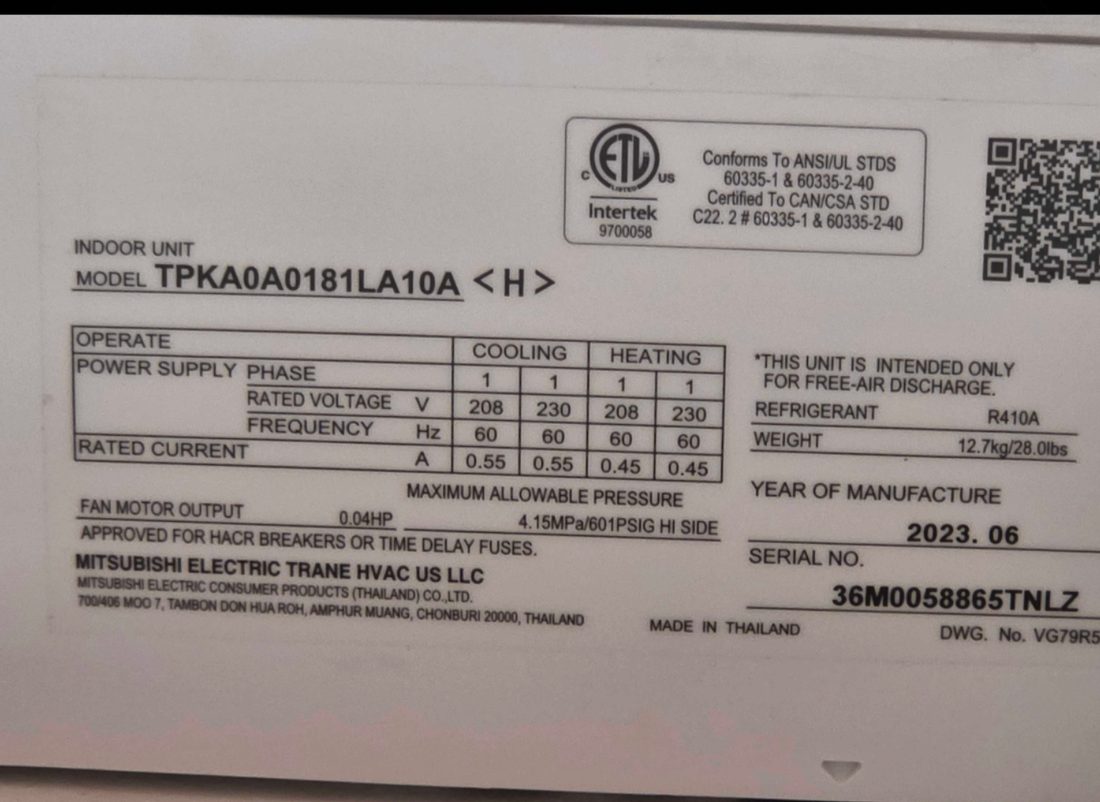
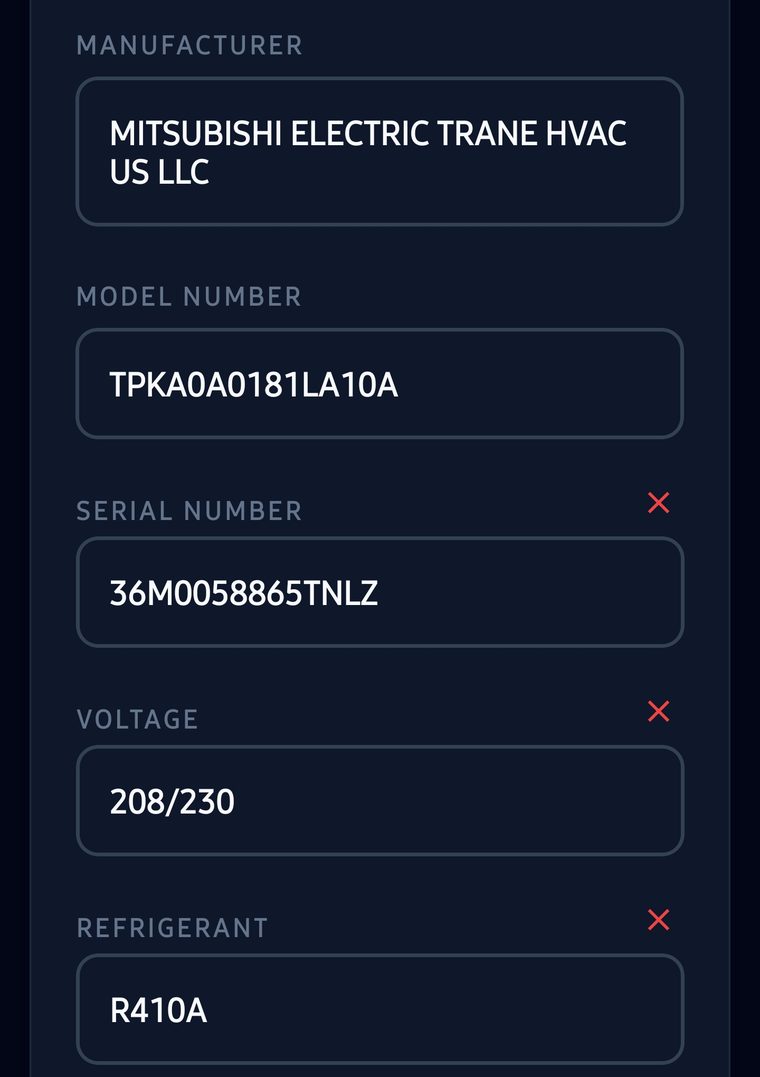
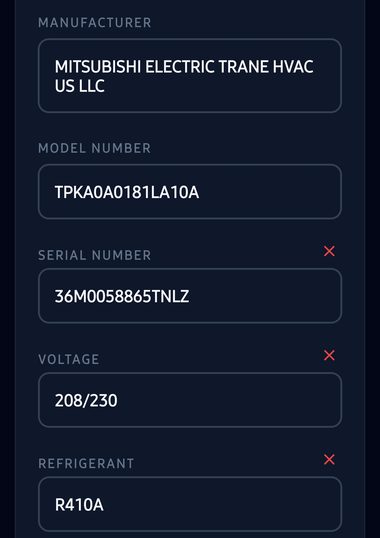
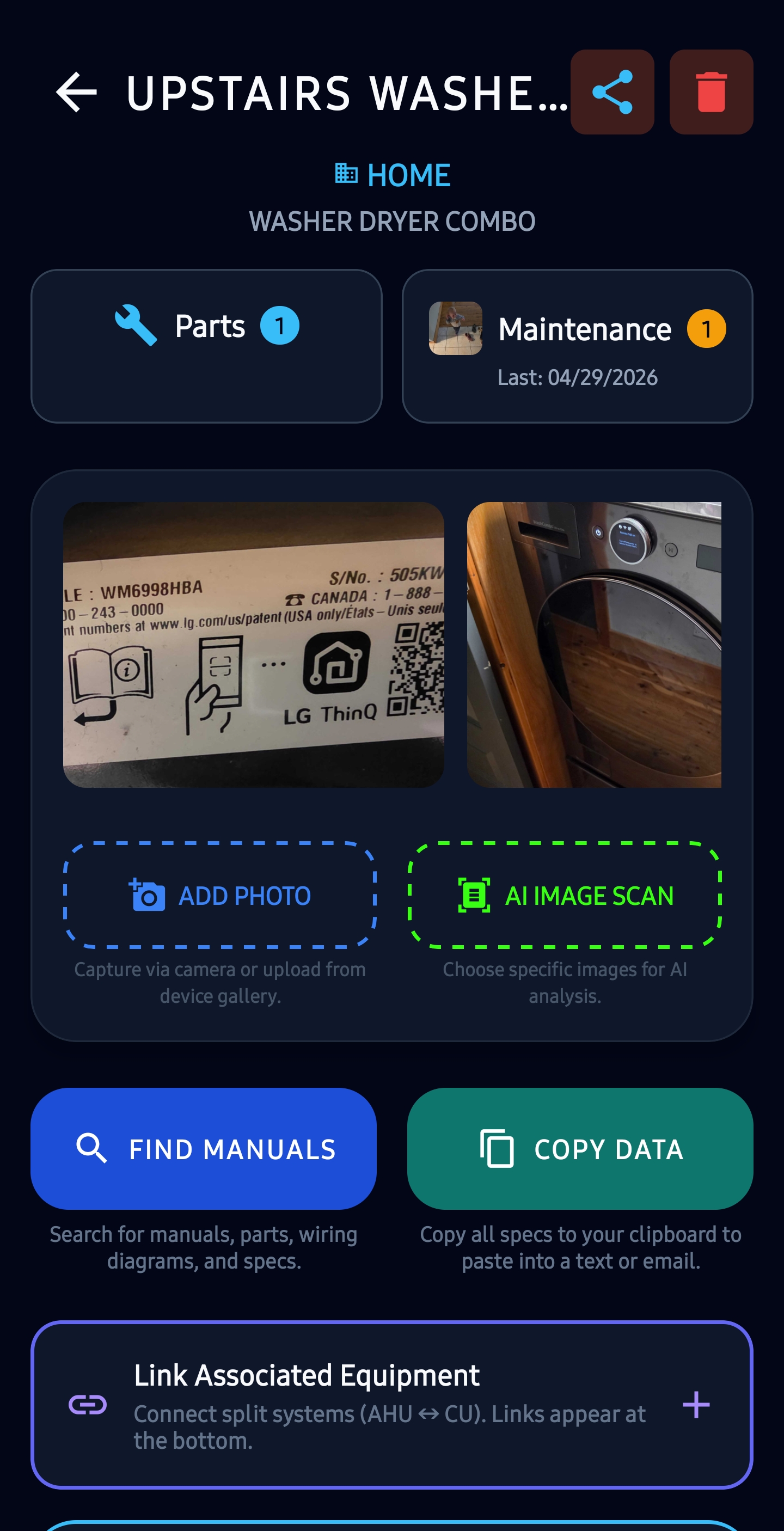
One photo of one real plate. Manufacturer, model, serial, phase, voltage, refrigerant, year of manufacture and fan-motor horsepower — read off this plate and filled in, with no typing. Plates that also print SEER, MCA, MOP, BTU, filter or belt sizes fill those fields too; this one prints none of them.
Faster than texting the office. Photograph the plate anywhere — the photo and the record are written on the phone with no signal and sync later. Reading the plate is a separate step that calls Google Gemini, so you run it once you have cellular or Wi-Fi. Nothing to log into, nothing to type twice, no waiting on a page to load in a mechanical room.
🤖 Stop typing nameplates, invoices and diagnoses
Four things you would otherwise do by hand, done from a photo by Google Gemini. Point your camera at a nameplate, a service invoice, or the unit itself. Every account gets 10 free AI scans, once, with one allowance per phone. Signing up is free.
- Log a rooftop unit in seconds
AI Nameplate Scanner — pulls manufacturer, model, serial, SEER, refrigerant type, MCA, MOP, BTU, filter specs, belt codes and the specs printed on the plate off any data plate photo. Equipment, spare parts and tools: a motor, a compressor or a drill has a plate on it too, and the same scan reads all of them. - Tell the customer what shape the unit is in
AI Condition Assessment — a Good/Fair/Poor rating with what it found, coil fouling, corrosion, oil staining, and what to do about it first. - Turn a paper invoice into a service record
Invoice & Work Order Scanner — photograph the receipt and it reads the date, technician, parts used and labor hours, then writes the maintenance log for you. - Work out why it is doing that
AI Diagnostics — describe the symptoms and your readings; it weighs them against the unit's specs and its last 5 service logs in a back-and-forth chat.
It works with no signal, and it keeps the leak-rate record
📴 Offline, on the base plan
A rooftop, a basement, a mechanical room with a foot of concrete over it — the record is written on the phone and syncs when there is signal again. It is not a paid add-on and not a higher tier here: offline records are how the free app works, on every plan.
📋 EPA §608 leak rate, before it becomes a violation
The leak-repair duty falls on whoever owns or operates the appliance, and on 1 January 2026 the threshold for HFC systems dropped from 50 lbs to 15 lbs (R-22 and other ozone-depleting refrigerants stay at 50 lbs) — so a lot of buildings are now in scope that never were. Log a charge and the annualized rate is worked out against the 10% / 20% / 30% thresholds in 40 CFR Part 84, with the appliance-type rules applied and a flag the moment one is crossed. Built for the contractors and property managers who carry that obligation without an enterprise refrigerant system doing the math for them. Try the calculator →
Bill the job. Get paid before you leave.
Turn the work you just logged into an invoice, send it as a link or show a QR code, and get paid by card, bank, PayPal or Venmo while you are still on site. Scan the supply-house receipt and the parts go on the bill too.
Bill the job
Finished work orders, PM visits and maintenance-plan charges go onto the invoice with + ADD WORK OR RECEIPT. Anything already billed says so, so nothing goes out twice.
Get paid on the spot
SHOW TO CUSTOMER puts a QR code on your screen. Your customer scans it and pays by card or bank, or opens PayPal or Venmo with the amount already filled in.
Paid invoices mark themselves paid
Card and bank payments go through Stripe into your own Stripe account. The invoice records the payment, and your phone tells you the money came in.
Scan the supply-house receipt, bill the parts
Photograph the receipt and the AI reads each line, the tax and the total. Mark each line billable, business or personal, and bill the parts at cost plus your markup.
Creating invoices, sending them as a PDF, PayPal and Venmo links and recording payments are free in the app. The invoice’s web link and card and bank payments are Pro, with a fee of 0.5% per card or bank payment, capped at $10, on top of Stripe’s own. Reading a receipt uses your 10 free AI scans, then Pro.
How to invoice and get paid → How to scan a receipt and bill it →
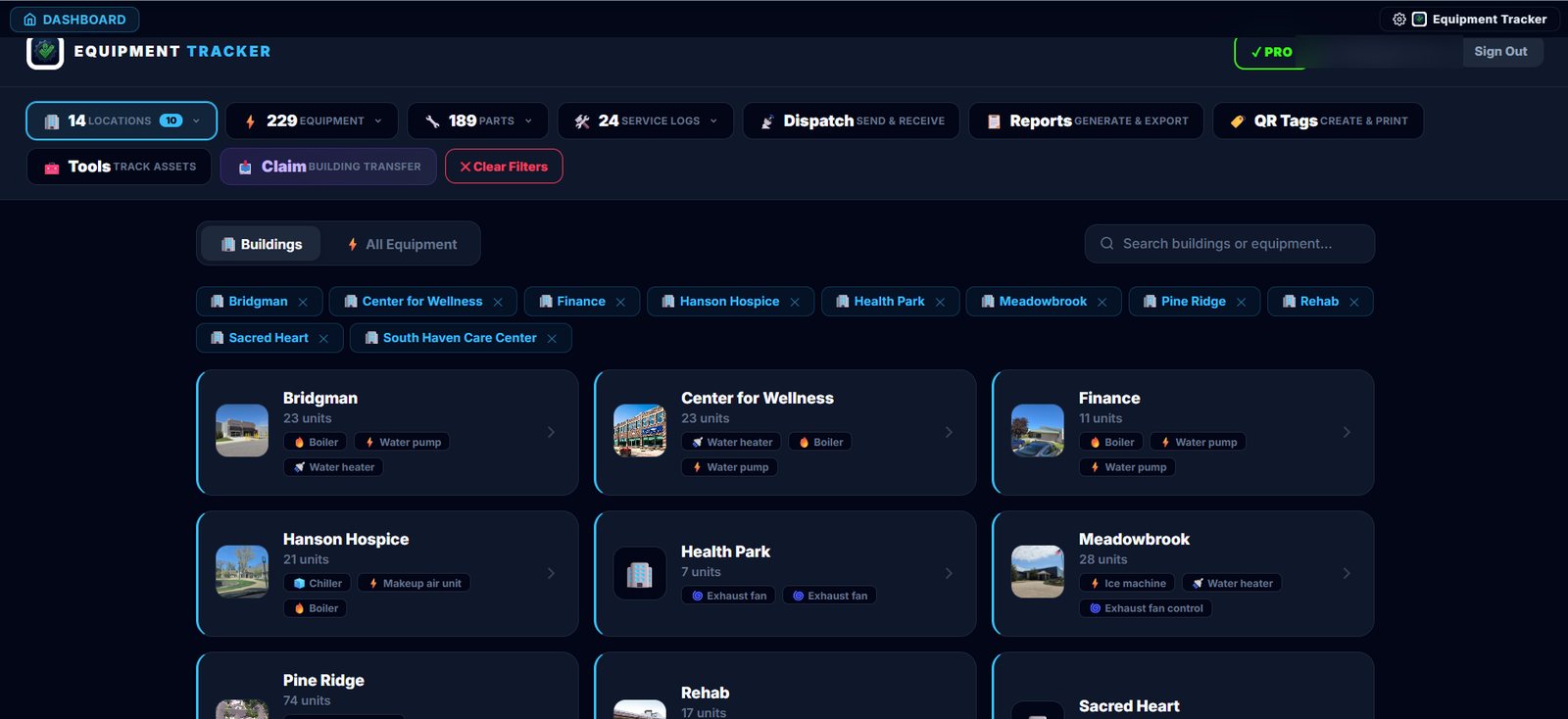
Every building, every piece of equipment, on one screen
What the web dashboard looks like once a portfolio is in it — buildings down the left, equipment counts and equipment types on every card, and the whole registry searchable. Included with Pro, in any browser, no install.
📷 Built-in QR & Barcode Scanner — Always Free
A native live-camera scanner built directly into the app. Reads 13 barcode formats including QR, Code 128, EAN-13, Data Matrix, and more. Works fully offline. Searches your equipment and parts database by serial number, model, or asset tag instantly. If nothing is found, prompts to create a new equipment record with the scanned code pre-filled.
🏢 Equipment & Building Management — Always Free
Organize every appliance and HVAC unit into building profiles with addresses, photos, and contacts. Track unlimited equipment with full spec sheets, photo galleries, warranty dates, and installation ages. Free forever — no limits.
- ✓ Unlimited buildings & equipment
- ✓ Unlimited photo galleries per piece of equipment
- ✓ Warranty & age tracking
- ✓ Parts & inventory management
- ✓ Full maintenance log history
- ✓ Recurring PM scheduling
Track Your Home Appliances & Warranties
You don't need to be an HVAC technician to get organized. Keep a digital record of your home's appliances, electronics, and mechanical systems, stored on your phone and backed up to the cloud with Pro. Skip the typing by letting our AI scan nameplates to extract models, serial numbers, and technical specs for you.
- ✓ Warranty Tracking: Log purchase dates and warranty terms directly in the equipment profile to keep expiration timelines organized in one place.
- ✓ Manuals & Receipt Photos: Attach manuals and service invoices as photos, and upload receipt images so they are handy when something breaks.
- ✓ 100% Free Core Tracking: Keep your appliance list, filter sizes, and basic maintenance history offline and free forever.
Go Pro for superpowers
Upgrade to unlock the full toolkit. All plans include a 7-day free trial for first-time subscribers.
AI Nameplate Scanner
Snap a photo of any data plate. Gemini AI reads it and fills in the manufacturer, model, serial, voltage, refrigerant type, SEER/EER rating, refrigerant charge weight and more, wherever the plate prints them — even on corroded or faded labels. Not just equipment: spare parts and tools carry plates too, and the same scanner reads a motor, a compressor or a drill exactly the same way. Free users get a 10-scan trial, then upgrade to Pro for unlimited scans.
10 free trial scans · no typing off the plate
AI Condition Assessment
Photograph any piece of equipment. Technician Report Mode generates structured visual inspection notes (coils, lines, contacts, cabinet) for building audits and contractor logs. Also automatically estimates equipment age directly from recognized manufacturer serial number formats.
Technician report logs · Age estimation
Invoice & Work Order Scanner
Photograph any service receipt, invoice, or work order. AI extracts date, technician, service type, parts used, labor hours, and total cost — then auto-creates a complete maintenance log entry with one tap. No manual re-entry required.
Turn any invoice photo into a service record
AI Diagnostics & Troubleshooting
Describe symptoms and enter measurements (voltage, pressures, temperatures). The AI analyzes the data alongside the equipment's specs and past maintenance history to deliver expert troubleshooting steps instantly — no app-swapping required.
Conversational chat · One-tap convert to maintenance log
Unlimited Cloud Backup
Automatic cloud backup to Firebase every time you save, with Smart Sync intelligence that detects mismatches between your device and the cloud so you can review and resolve them with a tap.
Auto-backup on save · Smart Sync conflict review
Live URL QR Tags
The QR creator itself is free, and so are two of its three modes: Text Mode (plain-text specs read straight off the sticker, no signal needed) and JSON Mode (offline app-to-app import). What Pro adds is Link Mode, which publishes a live spec page for the equipment and keeps it current, so any phone camera opens it with no app and no login. Your company logo goes on every tag in any mode, free.
Live public page · Text, JSON & logo free
Pro Reports & Revamped PDFs
Generate Electrical Load Schedules, Filter/Belt Reports, Refrigerant Summaries, Fire Damper Reports, and more — plus 5 landlord tools like a Prorated Rent Calculator, Rent-Increase Notice, and Fair Housing reference card — all exportable as branded PDFs with your company logo.
17 report types · Landlord tools · Photo proofs
Web Dashboard
Access your entire equipment database from any browser. Full desktop interface for managing buildings, equipment, and reports from your office computer.
Full access on desktop & tablet
Outside Sharing & Transfer Inbox
Send complete equipment records to any Equipment Tracker user outside your workspace — a building owner, a subcontractor, or another company. Guest technicians can log service reports on-site by scanning an equipment QR code, with nothing to install. Everything arrives in your secure Transfer Inbox for review before you merge it.
Cross-account sharing · Guest service portals
Building Ownership Transfer
Generate secure, one-time 6-character transfer codes to push entire buildings (including all equipment, parts, maintenance logs, site info, and photos) to other user accounts. Claim codes easily from Equipment Tracker Pro or the web dashboard.
One-time codes · Full portfolio sync
EPA §608 & AIM Act Compliance Tracker →
The leak-repair duty sits with whoever owns or operates the unit, and on 1 January 2026 the threshold for HFC systems dropped from 50 lbs to 15 lbs, while R-22 and other ozone-depleting refrigerants stay at 50 lbs — so buildings that were never in scope now are. Log a charge and the annualized rate is worked out against the 10% / 20% / 30% thresholds there and then, with a flag the moment one is crossed and every addition kept for the record. Built for the contractors and property managers carrying that obligation without an enterprise refrigerant system doing it for them.
Leak rate & 15 lb warning free · Branded §608 report is Pro
Vendor Check-In System
Post branded QR door signs at building entry points. Contractors check in/out on phone browsers without app installs. Automatically routes instant, individual email notifications to your distribution list.
Calendar log view · Instant email alerts
What techs actually say about it
Every one of these is a real review on the App Store or Google Play. Tap any card to read it on the store itself.
This is an awesome app for companies to use! You can track service history, inventory, and all the information on your equipment. You can even keep track of special tools with a tool checkout system. Any technician can walk up to a piece of equipment and instantly pull up its complete service history. You can also keep track of vendors, maintenance schedules, filter and belt changes, and much more. I actually had a maintenance guy call me saying he needed a motor for a unit. I was able to pull over, look up the unit, get all the information I needed, and order the correct motor right from the information in the app. It's a great way to keep all your equipment, maintenance, inventory, and service information organized and easily accessible for your entire team.
I have been in need of a formal equipment tracker for 15+ years of mechanical / HVAC service work! This application provides detailed mechanical equipment tracking, photos with ease of generating reports to share with field technicians, office workers and customers. I highly recommend this to anyone that finds the need to be detailed, organized and professional. 5 starts!!
This app makes tracking equipment so much easier. The AI scanner is fast and pulls model and serial numbers right off the nameplates, which saves a ton of time. The new updates for work orders and the maintenance calendar are great, and I really like that the field tools are free. It is simple to use and keeps everything organized by building. Highly recommend!
Keeping track of our building equipment and maintenance records is much easier with this app. The ai nameplate scanner saves a lot of time, too. Highly recommend it to anyone working in facility management.
Absolutely love the app. Very easy to use and the features are great. Highly recommended
I use it for my work!!
A selection of the written reviews on both stores. Reviews from the developer and his family are left out.
Listed on Capterra · Listed on Product Hunt · as of August 2026
Built and supported by Jonathan M. Curtis, a working HVAC service technician. Questions? Write to support@equipment-tracker.com.
Property maintenance software for landlords and property managers
A QR tag inside every unit’s door sends tenant repair requests to your phone, already knowing the unit. Turn them into work orders, let vendors sign in at the door, and keep every unit’s equipment and who fixed what. Door tags and vendor sign-in are Pro.
For property managers →HVAC service software for technicians and service companies
Scan a nameplate instead of typing it, keep each unit’s history on a QR tag, run PMs and work orders for the crew, and get the invoice paid on site. EPA leak rates are worked out for you, free.
For technicians and service companies →Home maintenance app for homeowners
Keep the furnace, air conditioner, water heater and appliances with their model numbers, warranties and service history, and get a reminder before maintenance is due. Free, with your records on your phone.
For homeowners →🌍 Six Languages — Always Free
English, Spanish (Latin American and European), French, German, Brazilian Portuguese and Italian. The app follows your phone's own language setting — nothing to switch on. Generated PDF reports and the AI Diagnostics and AI Condition Scan responses follow it too, not just the buttons. Refrigerant designations, belt codes, filter sizes, MERV ratings and every model, part and serial number stay exactly as printed on the equipment in every language, and anything you typed in yourself is never translated.
📖 From the Blog
View all articles →Real-Time SMS Alerts: Introducing Instant Vendor Check-In Notifications
We've added automated SMS check-in alerts for vendor and technician arrivals. Here is how it works, how consent is secured via our web opt-in form, and how to enable it.
Read article → 🗓️ Product FeaturesSet It and Forget It: Recurring PM Scheduling Is Now Built Into Equipment Tracker Pro
Every shop has a system for remembering filter changes — a sticky note, a spreadsheet, a phone reminder nobody reads. Recurring PM Scheduling replaces all of it: set an interval once, and the app tracks due dates, reminds you, and logs the work automatically.
Read article → 🏢 Property ManagementWho Was in My Building Today? The Case for a Digital Vendor Log
Paper sign-in sheets don't work — vendors skip them, entries are illegible, and finding a record from three months ago means digging through a notebook. Here's why a digital QR check-in log is a better answer for any building that has contractors and vendors coming through the door.
Read article → 🏷️ Product FeaturesQR Code Equipment Tracking: The Three Tag Modes, What a Scan Shows, and What It Costs
A QR tag on a rooftop unit is only worth screwing on if you know what the next person sees when they point a camera at it. The three scannable formats, what loads on the public page, what never gets published, what each mode costs, and the printers and label stock that survive a roof.
Read article → 🧊 Product FeaturesHow the Refrigerant Log Records EPA Section 608 Leak Rates
Every maintenance log now includes a Refrigerant Log section that calculates your annual leak rate on the spot, flags EPA Section 608 violations automatically, and stores the data permanently with the service record.
Read article → ⚖️ ComparisonEnterprise Bloat vs. Field Speed: Equipment Tracker Pro vs. EZOfficeInventory
EZOfficeInventory is built for IT departments and enterprise procurement teams. If you are an HVAC tech or property manager, you will spend more time configuring it than using it — and pay for the privilege.
Read article → 📋 HVAC TipsEPA Leak Rate Thresholds: 10% / 20% / 30% — Section 608 Exam Answers (2019 & 2026 Rules)
Studying for the EPA 608? The answer is 10% comfort cooling, 20% commercial refrigeration, 30% industrial process refrigeration — the same three thresholds under the 2019 Section 608 rule and the 2026 HFC rule. Plain-English explanation plus direct answers to the exam questions.
Read article → 🏠 How-To GuideThe Smart Homeowner's Guide to Tracking Appliances and Filters
Your home runs on mechanical equipment. Here is why you should be tracking your furnace, A/C, and major appliances like a professional property manager.
Read article →Start tracking smarter today
Free to use — track appliances, filter sizes, and warranties at no cost.
Upgrade to Pro for AI scanning, cloud sync, and more.
Every plan, Pro and Team, includes a 7-day free trial for first-time subscribers
Frequently Asked Questions
Everything you need to know about the Equipment Tracker Pro database and features.
What is the core purpose of Equipment Tracker Pro?
Equipment Tracker Pro is an easy-to-use CMMS designed specifically for HVAC technicians and property managers. It helps you track commercial equipment, parts inventories, maintenance logs, and EPA 608 compliance — with offline availability, QR codes, and AI-powered data entry.
Does Equipment Tracker Pro work without internet or cell service?
Yes. The mobile apps are built with an offline-first local cache. Every piece of equipment, parts list, and service log you save is written to your device and stays fully readable and editable with no signal at all. Cloud backup, which puts your records on the web dashboard and restores them onto a new or replacement phone, is a Pro feature; on the free plan your records live on the phone.
What features are included in the free tier?
The core tracking features are 100% free with no building or equipment caps. This includes offline barcode and QR code scanning, tracking equipment lists, documenting parts, logging basic maintenance records, and using a trial balance of 10 free AI scans.
How does the AI nameplate scanner work?
Instead of typing out 20+ technical specifications manually (e.g. manufacturer, model, serial, voltage, and refrigerant details), technicians take a single photo of the equipment's data plate. Our Gemini-powered AI extracts and structures these details automatically on-site.
How much does the Pro subscription cost?
The Pro plan is $9.99/month (or $79.99/year) per user. It unlocks unlimited Gemini AI nameplate scanning, conversational diagnostics, real-time cloud sync, access to the web dashboard, and the ability to export branded PDF reports.
How do Team Plans work for multi-person crews?
Team plans start at $39.99/month for 5 seats and scale in 5-seat blocks up to 50 seats under one subscription. Teammates join via a 6-character code and collaborate on live workspace data with Owner, Manager, Tech, or Viewer roles. The roles are fixed, and invoices and maintenance-plan prices are hidden from Techs and Viewers in the app.